Features
Every control has a job.
What each section does to your sound, and when you would reach for it. No audio engineering degree required.
RETROVERSE 90
1990s Character Engine
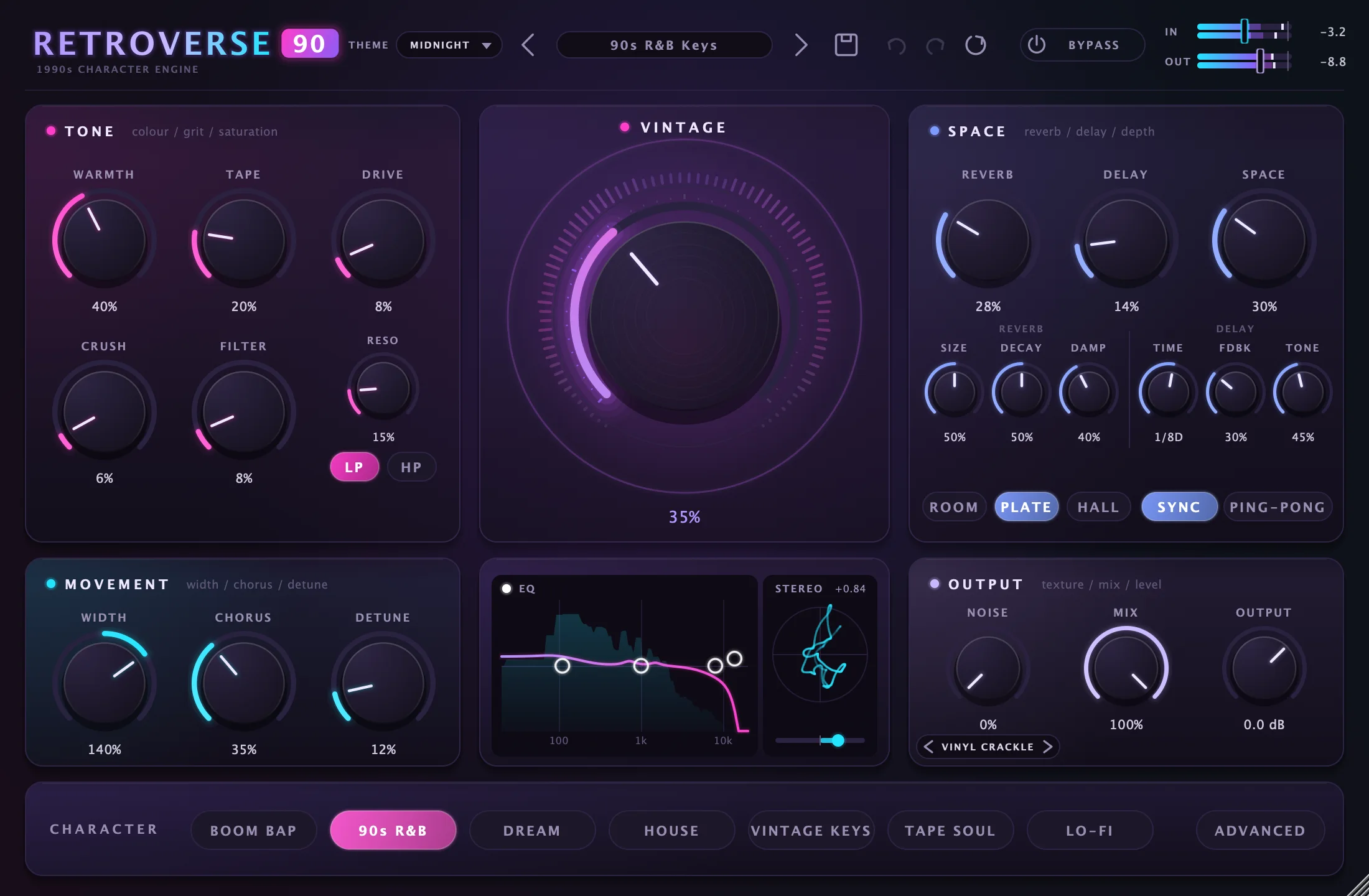
Tone · colour / grit / saturation
Warmth up front. Grit where you want it.
Six stages that take a clean signal from polished to played-out: low-mid body, tape, analog drive, sampler crunch and a resonant filter.
- Fatten thin synths and keys without turning the low end to mud
- Dial in the crunch of a 12-bit sampler for breaks and loops
- Sweep the filter for dusty, muffled intros or thin telephone tones
- Warmth0–100%
- Low-mid body around 190 Hz, a softer top end and gentle even harmonics.
- Tape0–100%
- Tape saturation, glue compression, head bump, high-frequency loss, and wow and flutter.
- Drive0–100%
- Analog-style saturation with up to +24 dB of drive, partly level-compensated.
- Crush0–100%
- Sampler-style reduction, from about 36 kHz down to 6 kHz and from 16 bits down to 5.
- Filter LP / HP0–100%
- Low-pass sweeps 20 kHz to 180 Hz. High-pass sweeps 20 Hz to 4 kHz. Click the lit button to switch it off.
- Reso0–100%
- Filter resonance, with peaks partly level-compensated.
Vintage · the signature colour
One big dial for the whole decade.
The centre knob is the sound of the plugin. It adds saturation, limits the bandwidth, adds a soft vowel-like colour and glues everything together, all loudness-matched so you hear character, not just volume.
- Reach a finished vintage tone with a single move
- Judge the change honestly, because level stays within about 1 dB
- Go from clean at 0% to thick, boxy and compressed at 100%
- Vintage0–100%
- Asymmetric even-harmonic saturation, bandwidth limiting, a drifting vocal formant, low-mid body, up to 3:1 glue compression and a faint noise bed that plays only with input.
Space · reverb / delay / depth
Place the sound in the room.
Three reverbs, a tempo-synced delay and a depth control that pushes a source back into the mix instead of just washing it out.
- Move from a tight room to a long hall of around 16 seconds
- Lock echoes to your session tempo, or bounce them across the stereo field
- Add distance with Space, without reaching for another reverb
- Reverb0–100%
- Reverb level, in Room, Plate or Hall.
- Size / Decay / Damp0–100%
- Room dimensions, decay time (up to about 4.3 s Room, 9 s Plate, 16 s Hall) and high-frequency damping.
- Delay0–100%
- Echo level, with Time, Fdbk and Tone beneath it.
- Time / Sync1/32 to 1/1, or 10–2000 ms
- A note value with Sync on, including dotted and triplet values, or free time with it off.
- Fdbk / ToneUp to 95%
- Echo repeats, always stable, from dark to bright.
- Ping-PongOn / Off
- Alternates echoes between left and right.
- Space0–100%
- Depth macro: early reflections, air absorption and a quieter direct sound, plus more reverb send.
Movement · width / chorus / detune
Wide, without falling apart in mono.
Lush chorus and micro-pitch doubling for that thick 90s stereo, plus a width control built so the extra side signal cancels exactly when the mix collapses to mono.
- Spread pads and keys while the bass stays centred
- Thicken a part without audible vibrato
- Widen even a mono source
- Width0–200%
- 100% leaves the image alone and 0% is mono. Above 100% it adds mono-safe width.
- Chorus0–100%
- Darker, BBD-style stereo chorus. Rate and depth follow the character mode.
- Detune0–100%
- Micro-pitch doubling: left up, right down by 3 to 22 cents, with a slow drift.
EQ & Stereo · frequency shaping / stereo view
See what you are shaping.
Drag points on a curve drawn over the live spectrum to shape the tone, and watch the stereo image on a vectorscope with a correlation readout.
- Add back air or remove boxiness after heavy colouring
- Spot phase problems before they reach the mix
- Move the filter by dragging it directly on the curve
- Low shelf30–350 Hz, ±15 dB
- Drag left and right for frequency, up and down for gain.
- Mid bell250 Hz–5 kHz, ±15 dB
- Shape the body of the sound.
- High shelf3–16 kHz, ±15 dB
- Open up or tame the top end.
- Filter pointCutoff and resonance
- The fourth point moves the Filter knob and resonance.
- StereoCorrelation +1 to below 0
- Output vectorscope. +1 is mono-compatible, below 0 warns of phase problems. The slider sets Width.
Output · texture / mix / level
Finish with texture.
Six noise layers, from vinyl crackle to room tone, sit on top of the finished sound. By default the noise follows your signal and fades with the tail, so silence stays silent.
- Add crackle or hiss that never hangs on after the music stops
- Blend the whole effect in parallel with one knob
- Compare with Bypass while everything stays time-aligned
- Noise0–100%
- Vinyl Crackle, Tape Hiss, Dusty Vinyl, Cassette, Radio Static or Room Tone. Off by default.
- Mix0–100%
- Dry/wet for the whole effect. At 0% the output is the input, sample-exact.
- Output−24 to +12 dB
- Final level.
- BypassOn / Off
- A click-free 30 ms crossfade to dry. Latency stays constant, so A/B comparisons stay aligned.
PUNCH
Low-End Control Engine
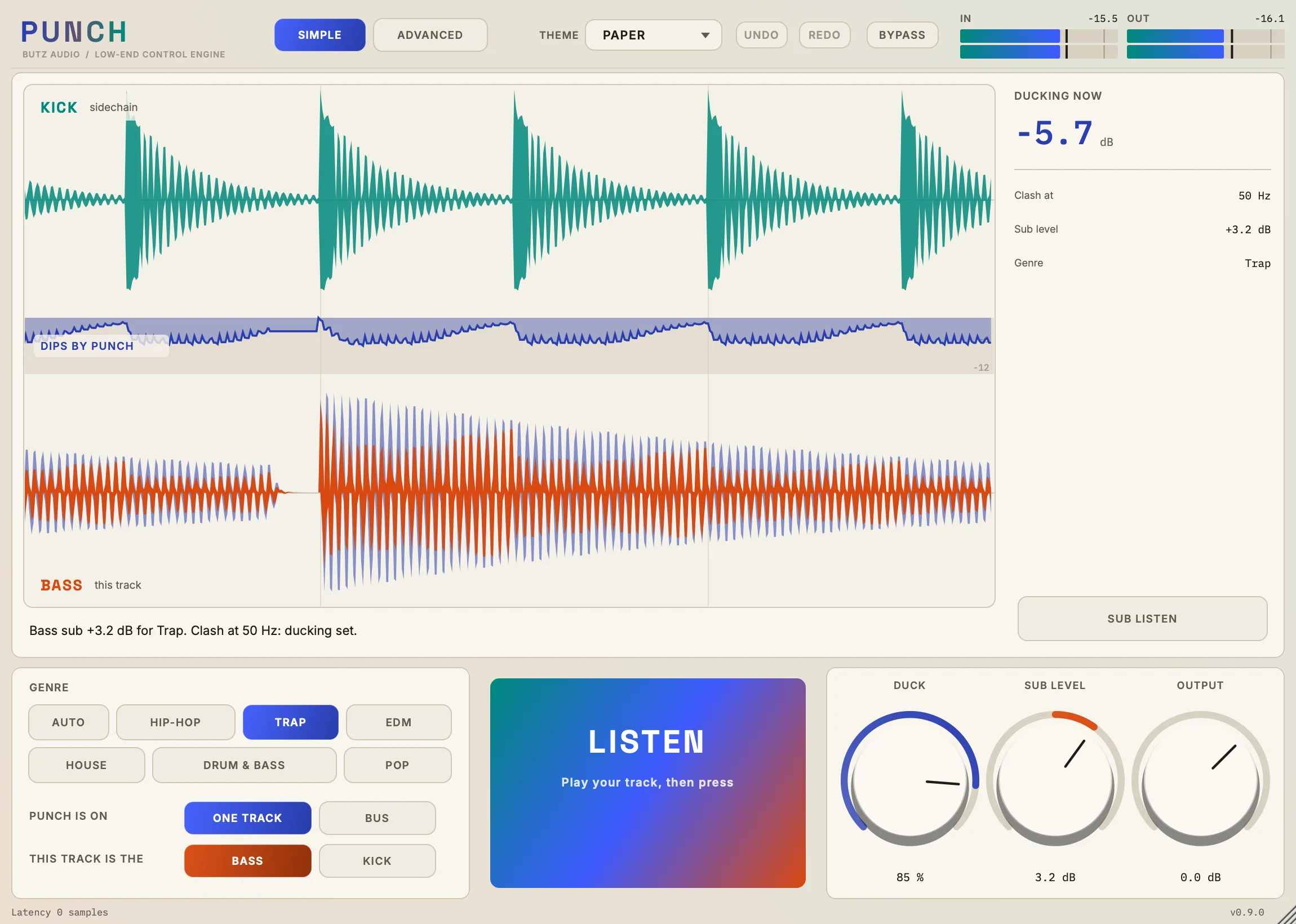
Live screen · kick / bass / dips
See the dips, not just a meter.
Your real kick and bass waveforms, one above the other on the same clock, the way they look in a playlist. A line between them falls every time PUNCH cuts.
- Follow a kick hit straight down and see its dip line up with it
- See what was taken out as a paler edge around the signal that ducks
- Get a clear message when the sidechain isn't reaching the plugin
- Kick and bass lanes2.5 s in view
- Newest audio on the right. Both waveforms share one zoom, so their sizes stay true to each other.
- Dips by PUNCHDown to −12 dB
- A line that falls whenever PUNCH cuts.
- Ducking nowdB
- The deepest cut in the sub over the last half second, measured from the audio.
- Clash atHz
- Where both tracks share the most energy right now.
Listen · one press
Press once. PUNCH does the setup.
LISTEN hears both tracks for about 6 seconds of audio, works out which one is the kick, finds where they clash, aims the ducking there and sets the sub balance.
- Get a working starting point in seconds
- Undo all of it with one undo step
- Cancel at any time and nothing changes
- ListenAbout 6 s of audio
- Waits for audio for up to 30 seconds, then sets the mode, the ducking and the sub level.
- Duck0–100%
- How much of the ducking to use.
- Sub LeveldB
- This track's sub, up or down.
- OutputdB
- This track's final level.
Genre · feel / sub target
Compare genres without listening again.
Each genre sets a ducking feel and a sub target. After a LISTEN you can click through them, and the balance changes at once.
- Leave it on Auto to decide from what PUNCH hears
- Try Trap, House or Drum & Bass in one click
- Treat each one as a starting point, not a rule
- Auto−2 to +1 dB
- Held bass notes lead the kick by up to 1 dB, and short ones sit up to 2 dB under it.
- Genres6 targets
- Hip-Hop, Trap, EDM, House, Drum & Bass and Pop.
One track or bus · routing
Put it where it suits your session.
Run PUNCH on the bass with the kick on its sidechain, or use Bus Mode so one PUNCH carries both signals and plays them together.
- Choose who ducks without re-routing anything
- Keep the classic one-track setup when you prefer it
- Have Listen correct swapped kick and bass inputs
- One TrackSidechain
- PUNCH sits on the bass or the kick, hears the other through the sidechain, and only plays the track it's on.
- BusTwo inputs
- One signal arrives normally and the other through the sidechain, and PUNCH plays both at its output.
- Which one ducksBass / Kick
- Bass ducks the bass for the kick. Kick ducks the kick for the bass.
Sub Listen · hear only the sub
Check the sub on its own.
One button lets you hear only what is below 120 Hz, so you can judge whether the sub is clean, in tune and balanced.
- Hear one track's sub, or both on a bus
- Never print it by accident, because it is ignored while rendering
- Turns off when you close the window or leave the Simple page
- Sub ListenBelow 120 Hz
- For monitoring only. It isn't saved and can't end up in a bounce.
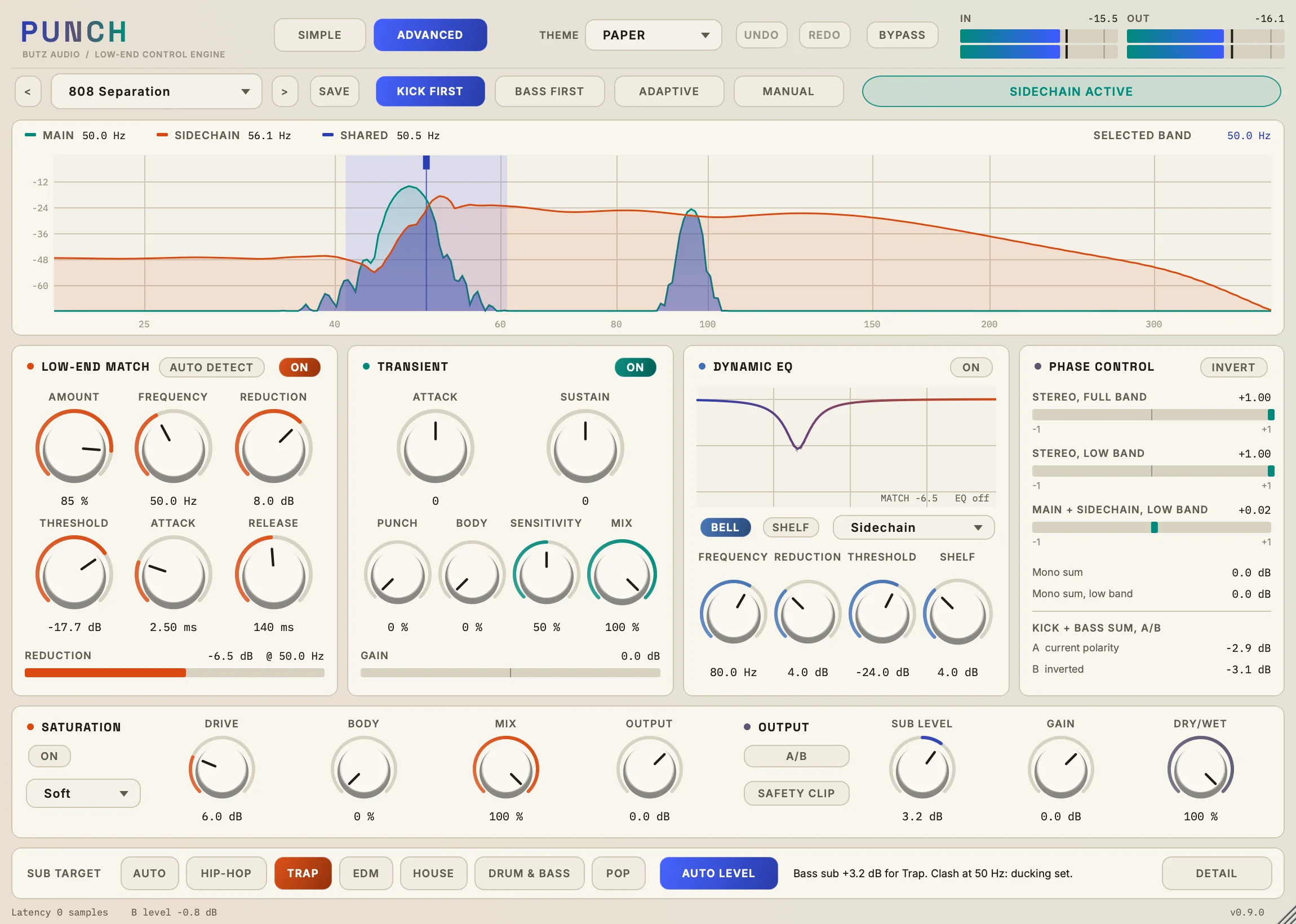
Advanced · every control
Everything underneath, when you want it.
A low-end analyser sits above Low-End Match, a Transient shaper, Dynamic EQ, Phase Control and Saturation, with Kick First, Bass First, Adaptive and Manual modes.
- See main, sidechain and shared energy on one analyser
- Shape attack and sustain, then add saturation with up to 4x oversampling
- Check polarity and mono behaviour with confidence readings
- Modes4
- Kick First, Bass First, Adaptive and Manual. Switching modes never changes your knobs.
- Low-End MatchAmount, Frequency, Reduction
- The ducking itself, with threshold, attack and release, plus Auto Detect suggestions that change nothing until you accept them.
- TransientAttack, Sustain, Punch, Body
- Shapes the hit, with Sensitivity and Mix.
- Dynamic EQBell or shelf
- A dynamic cut, with sidechain or main detection.
- Phase Control−1 to +1
- Correlation meters, a mono check, polarity and a kick and bass A/B reading.
- SaturationSoft or hard clip
- Drive, Body, Mix and Output, with 1x, 2x or 4x oversampling.